A Location QR Code Generator helps businesses and individuals create QR codes that instantly open a specific location on a map application when scanned.
Instead of manually typing an address into Google Maps or another navigation app, users can scan the QR code and get directions immediately. This improves convenience, reduces errors, and helps customers reach the correct destination faster.
Location QR Codes are widely used by retail stores, restaurants, hotels, real estate companies, event organizers, educational institutions, healthcare providers, offices, and local businesses.
Dynamic QR Code functionality can also be available for Location QR Codes. Dynamic QR Codes are a common feature that can be used across all QR types including URL, WiFi, Phone, SMS, Email, Business Card, Document, PDF, Payment, and Multi-Link QR Codes.
What is a Location QR Code?
A Location QR Code is a QR code that stores geographic location information such as a map address, coordinates, or navigation destination.
When scanned, the QR code opens a mapping application and directs users to the specified location.
Location QR Codes can be used for:
- Business locations
- Retail stores
- Restaurants
- Hotels
- Event venues
- Property locations
- Offices
- Pickup points
- Tourist attractions
How Does a Location QR Code Work?
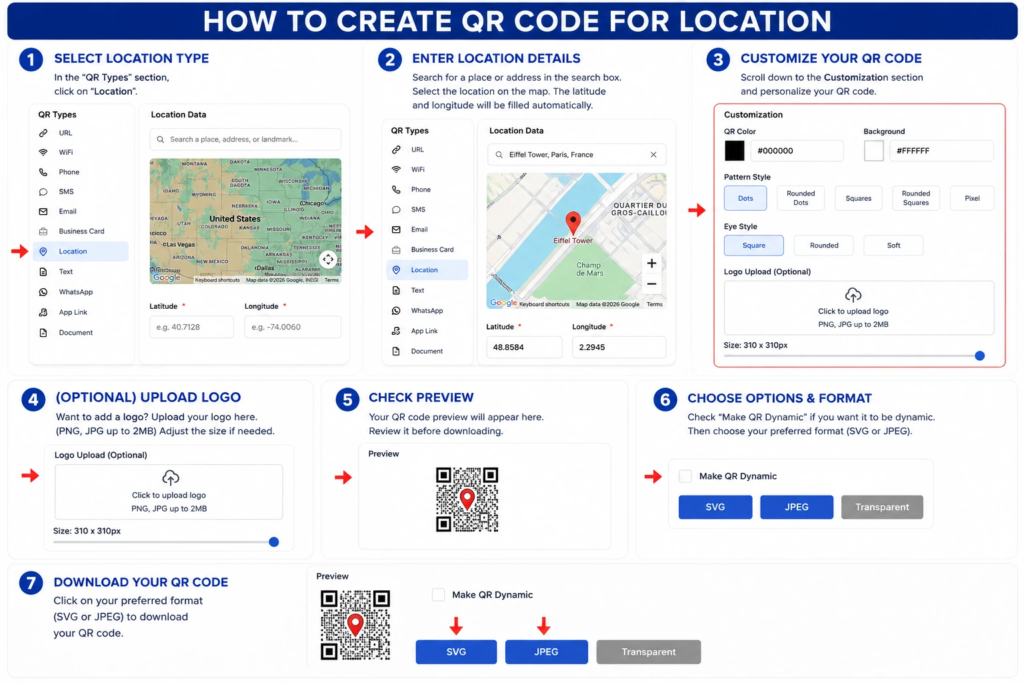
Step 1: Select the Location QR Type
- Open the QR code generator.
- In the QR Types section, click Location.
Step 2: Enter the Location Details
- Search for the desired place, address, or landmark in the search box.
- Select the correct location from the map.
- The latitude and longitude will be filled in automatically.
Step 3: Customize Your QR Code
- Scroll to the Customization section.
- Choose the QR code color.
- Select the background color.
- Pick a pattern style (Dots, Rounded Dots, Squares, Rounded Squares, or Pixel).
- Choose an eye style (Square, Rounded, or Soft).
Step 4: (Optional) Upload a Logo
- Click the Upload Logo area.
- Upload a PNG or JPG file (up to 2 MB).
- Adjust the logo size using the slider if needed.
Step 5: Check the Preview
- Review the QR code preview.
- Verify that the selected location and design settings are correct.
Step 6: Choose Output Options
- (Optional) Enable Make QR Dynamic if you want a dynamic QR code.
- Select your preferred download format:
- SVG – Best for high-quality printing.
- JPEG – Best for websites and digital use.
- Transparent – Best for use on different backgrounds.
Step 7: Download the QR Code
- Click your preferred format (SVG, JPEG, or Transparent) to download the QR code.
- Save the file and test it by scanning it with a smartphone to ensure it opens the correct location in the map application.
Why Location QR Codes Are Useful
Many customers struggle to find locations when addresses are long, complex, or difficult to enter manually. A Location QR Code eliminates this problem by providing instant navigation access.
This improves customer experience, reduces missed appointments, and helps businesses guide visitors to the correct destination.
Key Benefits of Using a Location QR Code Generator
1. Instant Navigation
Users can open directions immediately without typing an address. This saves time and makes it easy for customers to find your location.
2. Reduces Address Entry Errors
Manual address entry often leads to mistakes, which can result in lost customers or missed appointments. QR Codes eliminate this issue entirely.
3. Better Customer Experience
Customers can find businesses faster and more easily, leading to higher satisfaction and repeat visits.
4. Ideal for Offline Marketing
Location QR Codes work well on flyers, brochures, posters, banners, and print advertisements where customers need directions.
5. Improves Event Attendance
Attendees can easily navigate to event venues, reducing confusion and late arrivals.
6. Useful for Multiple Industries
Retail, hospitality, healthcare, education, real estate, and service businesses can all benefit from Location QR Codes.
7. Supports Local Marketing
Businesses can drive more foot traffic by simplifying directions and making it easier for customers to find them.
Dynamic QR Code Feature for Location QR Codes
What is a Dynamic QR Code?
A dynamic QR code is a QR code that can be managed, tracked, and updated after creation depending on the QR platform’s available features.
Dynamic QR Code features may include:
- Scan Analytics
- Campaign Tracking
- Location Insights
- Device Analytics
- Editable QR Content
- Centralized Management
Why Dynamic QR Codes Are Useful
Businesses sometimes move offices, open new branches, or change event venues. Dynamic QR functionality can help manage such changes more efficiently.
Instead of reprinting all marketing materials with a new QR code, businesses can simply update the destination address in the QR platform. This saves time, money, and effort.
Dynamic QR Codes for All QR Types
Dynamic QR functionality can be available across all QR categories including URL QR Codes, WiFi QR Codes, Phone QR Codes, SMS QR Codes, Email QR Codes, Business Card QR Codes, Location QR Codes, Document QR Codes, PDF QR Codes, Payment QR Codes, and Multi-Link QR Codes.
Location QR Code Use Cases
1. Retail Stores
Help customers find store locations quickly. Place QR codes on flyers, advertisements, and storefront windows to drive foot traffic.
2. Restaurants and Cafes
Allow customers to navigate directly to your location. QR codes on menus, takeaway bags, and social media make it easy for diners to find you.
3. Hotels and Resorts
Make it easier for guests to find accommodations. Place QR codes on booking confirmations, brochures, and websites.
4. Real Estate Properties
Share property locations through brochures, listings, signage, and business cards. Prospective buyers can navigate to properties instantly.
5. Event Venues
Provide navigation for conferences, weddings, exhibitions, and meetings. QR codes on invitations and banners help attendees find venues.
6. Educational Institutions
Help students and visitors locate campuses and facilities. Place QR codes on websites, brochures, and campus signage.
7. Healthcare Facilities
Guide patients to clinics, hospitals, and diagnostic centres. QR codes on appointment reminders and health documents simplify navigation.
8. Corporate Offices
Assist clients, partners, and job candidates in finding office locations. QR codes on business cards and emails improve accessibility.
9. Tourist Attractions
Provide navigation to landmarks and destinations. QR codes on brochures and tourism materials enhance visitor experiences.
10. Pickup and Delivery Locations
Improve logistics and customer convenience. QR codes on delivery instructions help drivers find pickup points.
Location QR Code vs Other QR Code Types
Location QR Code vs URL QR Code
A Location QR Code opens a map location, while a URL QR Code opens a website or landing page.
Use Location QR Code for directions. Use URL QR Code for website visits.
Location QR Code vs Phone QR Code
A Phone QR Code starts a phone call, while a Location QR Code provides directions.
Use Phone QR Code for calls. Use Location QR Code for navigation.
Location QR Code vs Business Card QR Code
A Business Card QR Code shares contact information, while a Location QR Code focuses on navigation.
Use Business Card QR Code for complete contact details. Use Location QR Code for directions.
Location QR Code vs Multi-Link QR Code
A Multi-Link QR Code can share multiple destinations, while a Location QR Code is dedicated to a specific location.
Use Location QR Code for a single address. Use Multi-Link QR Code when you want to share location, phone, website, and social links together.
Best Practices for Creating a Location QR Code
1. Verify the Exact Location
Always confirm the map location before publishing the QR code. Test it on different mapping applications to ensure accuracy.
2. Add a Clear Call to Action
Tell users what will happen when they scan the QR code.
Good examples:
- Scan for Directions
- Find Us on the Map
- Navigate to Our Location
- Get Directions Instantly
- Scan to Find Our Store
3. Test on Multiple Devices
Verify navigation works correctly across different smartphones and mapping applications like Google Maps, Apple Maps, and Waze.
4. Use Dynamic QR Features
Dynamic QR functionality can simplify future updates and analytics. If your business moves or opens new branches, dynamic features can help manage updates without reprinting materials.
5. Place QR Codes Strategically
Position them where customers are likely to need directions. Good locations include flyers, brochures, storefront windows, business cards, and event signage.
Where Can You Place a Location QR Code?
Location QR Codes can be placed on many offline and digital materials:
- Business Cards
- Flyers
- Brochures
- Posters
- Banners
- Storefront Windows
- Property Listings
- Event Invitations
- Conference Materials
- Vehicle Branding
- Advertisements
- Email Signatures
- Websites and Landing Pages
- Social Media Profiles
Industries That Can Use Location QR Codes
Retail
Retail stores can use Location QR Codes to help customers find their stores, especially in malls or large shopping areas.
Restaurants
Restaurants and cafes can use QR codes to help diners locate their outlets and provide directions for delivery drivers.
Hotels and Hospitality
Hotels and resorts can use QR codes on booking confirmations and brochures to guide guests to their properties.
Healthcare
Clinics, hospitals, and diagnostic centres can help patients navigate to their facilities using QR codes.
Education
Schools, colleges, and training institutes can help students and visitors find campuses and classrooms.
Real Estate
Agents and builders can share property locations through brochures, signage, and listings.
Events and Conferences
Event organizers can help attendees navigate to venues, halls, and parking areas.
Tourism
Tourist attractions and travel agencies can use QR codes to guide visitors to landmarks and destinations.
Corporate Offices
Corporate offices can use QR codes to help clients, partners, and candidates find their locations.
Professional Services
Consultants, lawyers, and service providers can use QR codes to direct clients to their offices.
Related QR Code Generators You May Also Need
Depending on your business goals, you may also benefit from a URL QR Code, Business Card QR Code, vCard QR Code, Phone QR Code, Email QR Code, WhatsApp QR Code, Document QR Code, PDF QR Code, Event QR Code, Payment QR Code, or a Multi-Link QR Code.
If you want users to call your business directly, a Phone QR Code is the right choice. For website visits, use a URL QR Code. For sharing complete contact information, use a Business Card QR Code or vCard QR Code.
If you want to share documents, brochures, or manuals, use a Document QR Code or PDF QR Code. For event registrations, use an Event QR Code. For collecting payments, use a Payment QR Code.
If you want to share multiple options from one QR code such as location, phone, website, WhatsApp, and social links together, a Multi-Link QR Code is a better option.
FAQs
What is a Location QR Code?
A Location QR Code opens a map application and displays a specific location when scanned.
What is a Location QR Code Generator?
It is a tool used to create QR codes that provide directions and navigation to a specific address or coordinates.
Can businesses use Location QR Codes?
Yes. They are useful for stores, offices, restaurants, hotels, clinics, event venues, and any business with a physical location.
Can Location QR Codes be dynamic?
Yes. Dynamic QR functionality may provide tracking, analytics, and management capabilities depending on the platform.
Why should businesses use Location QR Codes?
They help customers find locations faster, reduce navigation errors, improve customer experience, and increase foot traffic.
Where should I place a Location QR Code?
Place Location QR Codes on business cards, flyers, brochures, posters, storefront windows, websites, emails, and event signage.
Can I change the location after printing the QR code?
If you use a dynamic Location QR Code, you may be able to update the address or coordinates without reprinting the QR code, depending on the platform.
Is Location QR Code different from URL QR Code?
Yes. A URL QR Code opens a website or landing page, while a Location QR Code opens a map location and provides directions.
Conclusion
A Location QR Code Generator is a valuable tool for helping customers, visitors, and prospects navigate directly to your location.
By simplifying directions and reducing address entry errors, Location QR Codes improve convenience, increase foot traffic, and enhance customer experience. They are easy to create, simple to use, and effective for businesses of all sizes.
Combined with Dynamic QR Code functionality, Location QR Codes become an even more powerful solution for businesses, events, and organizations that rely on accurate location sharing and navigation.
If your business has a physical location and you want to make it easy for customers to find you, a Location QR Code is one of the simplest and most effective tools you can use.
Ready to create your own QR code?
Put these strategies into practice. Generate clean, high-resolution static or dynamic QR codes in seconds with full design customization, vector export, and scan analytics.
Zain
Technical Writer & QR Specialist