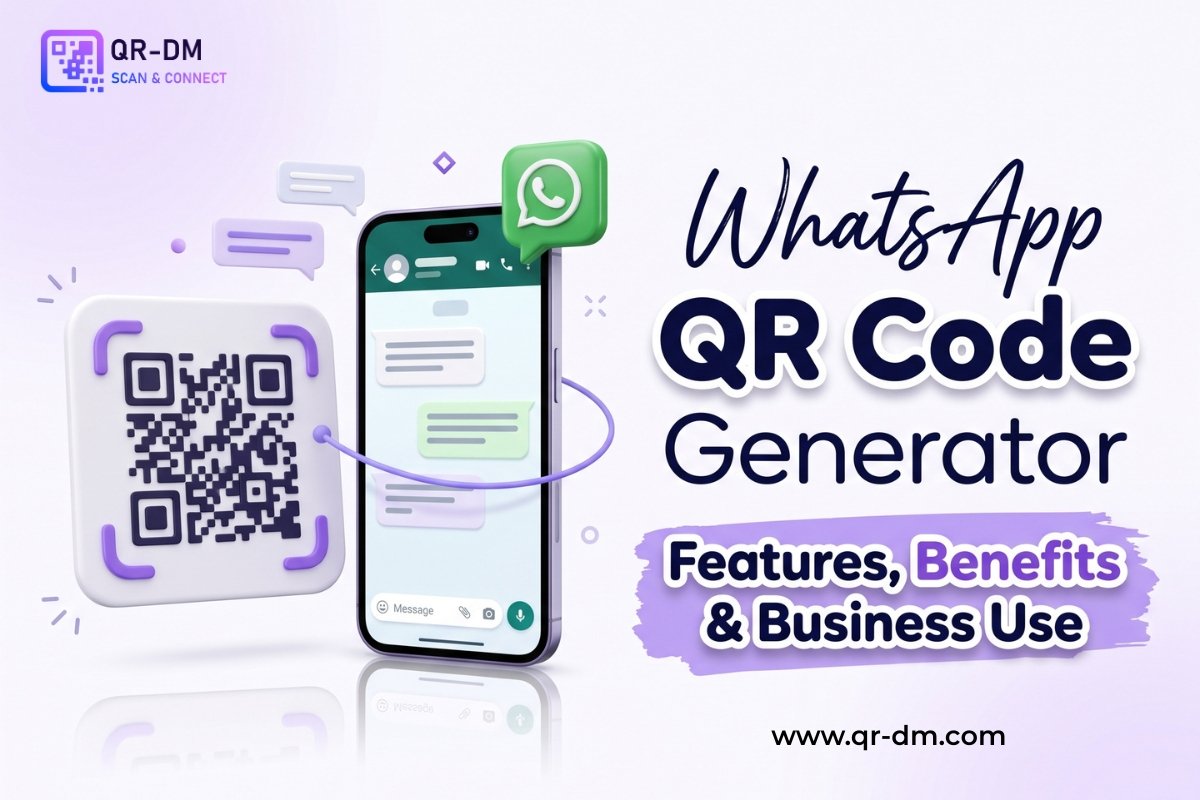
A WhatsApp QR Code Generator helps businesses and individuals create QR codes that instantly open a WhatsApp chat when scanned.
Instead of manually saving a phone number and searching for a contact on WhatsApp, users can scan the QR code and start a conversation immediately. This simplifies communication, improves customer engagement, and increases response rates.
WhatsApp QR Codes are widely used by businesses, customer support teams, sales departments, restaurants, healthcare providers, educational institutions, real estate agencies, consultants, retailers, and local service providers.
Dynamic QR Code functionality can also be available for WhatsApp QR Codes. Dynamic QR Codes are a common feature that can be used across all QR types including URL, WiFi, Phone, SMS, Email, Business Card, Location, Document, PDF, Payment, and Multi-Link QR Codes.
What is a WhatsApp QR Code?
A WhatsApp QR Code is a QR code that contains a WhatsApp chat link. When scanned, it opens WhatsApp directly and starts a conversation with a predefined phone number.
The QR code can also include a pre-filled message that helps users start conversations more quickly.
For example:
- Phone Number: +91XXXXXXXXXX
- Pre-filled Message: “Hi, I would like more information about your services.”
How Does a WhatsApp QR Code Work?
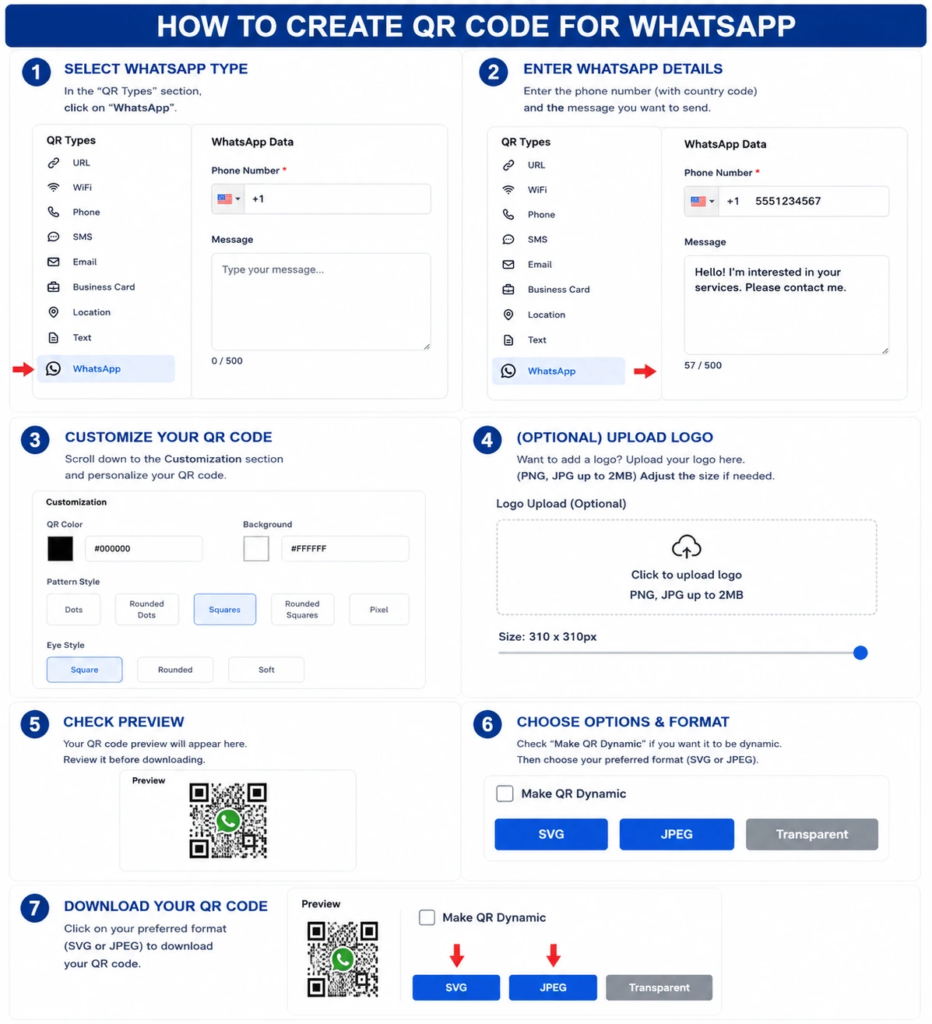
Step 1: Select the WhatsApp QR Type
- Open the QR code generator.
- In the QR Types section, click WhatsApp.
Step 2: Enter Your WhatsApp Details
- Enter your phone number, including the country code.
- Type the message you want users to send automatically when they scan the QR code.
- Example:
- Phone Number: +1 5551234567
- Message: Hello! I’m interested in your services. Please contact me.
Step 3: Customize Your QR Code
- Scroll to the Customization section.
- Choose the QR code color.
- Select the background color.
- Pick a pattern style (Dots, Rounded Dots, Squares, Rounded Squares, or Pixel).
- Choose an eye style (Square, Rounded, or Soft).
Step 4: (Optional) Upload a Logo
- Click the Upload Logo area.
- Select a PNG or JPG file (up to 2 MB).
- Adjust the logo size using the slider if needed.
Step 5: Preview the QR Code
- Review the QR code preview.
- Make sure the phone number, message, colors, and logo appear correctly.
Step 6: Choose Output Options
- If you want an editable QR code, check Make QR Dynamic.
- Select your preferred download format:
- SVG (best for printing and scaling)
- JPEG (best for general use)
- Transparent (if available)
Step 7: Download the QR Code
- Click your preferred format (SVG or JPEG) to download the QR code.
- Save the file and test it by scanning it with a smartphone to ensure it opens WhatsApp with the pre-filled message.
Why WhatsApp QR Codes Are Useful
WhatsApp is one of the world’s most widely used messaging platforms. Customers often prefer messaging over phone calls or email because it is fast, convenient, and familiar.
A WhatsApp QR Code removes barriers to communication and encourages users to contact businesses instantly.
Key Benefits of Using a WhatsApp QR Code Generator
1. Instant Customer Communication
Customers can start a WhatsApp conversation immediately after scanning. This eliminates the need to manually type phone numbers or search for contacts.
2. Improves Lead Generation
Businesses can collect enquiries, bookings, consultations, and sales leads more efficiently through WhatsApp conversations.
3. Reduces Friction
No need to manually save phone numbers or search for contacts. The QR code handles everything automatically.
4. Higher Engagement Rates
WhatsApp messages often receive faster responses compared to other communication channels like email or website contact forms.
5. Supports Customer Support
Businesses can provide quick assistance through WhatsApp conversations, improving customer satisfaction and response times.
6. Useful for Offline Marketing
WhatsApp QR Codes can turn brochures, flyers, posters, packaging, and advertisements into direct communication tools.
7. Mobile-Friendly Experience
Most users already have WhatsApp installed on their smartphones, making communication seamless and familiar.
Dynamic QR Code Feature for WhatsApp QR Codes
What is a Dynamic QR Code?
A dynamic QR code is a QR code that can be managed, tracked, and updated after creation depending on the QR platform’s available features.
Dynamic QR Code features may include:
- Scan Analytics
- Campaign Tracking
- Device Insights
- Location Analytics
- Editable Destination Settings
- Centralized QR Management
Why Dynamic QR Codes Are Useful
Businesses may update WhatsApp numbers, departments, support teams, or marketing campaigns over time. Dynamic QR functionality can help simplify management and tracking without requiring businesses to reprint or redistribute QR codes.
For example:
- A business may change its primary WhatsApp number.
- A customer support team may require a different contact number.
- A marketing campaign may need to route messages to different departments.
- A business may want to track which locations or campaigns generate the most scans.
Dynamic QR Codes help businesses manage these changes effectively.
Dynamic QR Codes for All QR Types
Dynamic QR functionality can be available across all QR categories including URL, WiFi, Phone, SMS, Email, WhatsApp, Business Card, Location, Text, PDF, Document, Event, Payment, App Download, Multi-Link, and vCard QR Codes.
This makes dynamic QR codes a valuable feature for businesses that use QR codes extensively across marketing, sales, customer support, events, operations, and communication.
WhatsApp QR Code Use Cases
1. Customer Support
Allow customers to contact support teams instantly. Businesses can place WhatsApp QR Codes on product packaging, support documents, and websites to provide quick assistance.
2. Sales Enquiries
Generate leads and answer product-related questions quickly. Sales teams can use WhatsApp QR Codes on business cards, brochures, and advertisements.
3. Appointment Booking
Clinics, salons, consultants, and service providers can accept bookings through WhatsApp. Patients and clients can send appointment requests with a single scan.
4. Restaurant Orders
Restaurants can receive reservations and takeaway orders directly through WhatsApp. This reduces phone call volume and simplifies order management.
5. Real Estate Enquiries
Property buyers can contact agents instantly for pricing and site visit information. Real estate businesses can place QR codes on property boards and brochures.
6. Educational Admissions
Students can send admission and course enquiries quickly. Schools, colleges, and coaching institutes can use WhatsApp QR Codes for parent and student communication.
7. Event Registration
Event organizers can collect registrations and attendee enquiries. QR codes can be placed on event posters, banners, and invitations.
8. Product Support
Manufacturers can provide customer assistance through WhatsApp. Product packaging and manuals can include QR codes for support enquiries.
9. Retail Customer Service
Retailers can answer product questions and process customer requests efficiently. QR codes can be placed on product shelves and store counters.
10. Local Service Businesses
Plumbers, electricians, consultants, and home service providers can receive enquiries instantly. WhatsApp QR Codes on vehicles and service documents improve response rates.
WhatsApp QR Code vs Other QR Code Types
WhatsApp QR Code vs Phone QR Code
A Phone QR Code starts a phone call, while a WhatsApp QR Code starts a WhatsApp conversation.
Use Phone QR Code for voice calls. Use WhatsApp QR Code for messaging and chat-based communication.
WhatsApp QR Code vs SMS QR Code
An SMS QR Code opens the messaging application, while a WhatsApp QR Code opens WhatsApp directly.
Use SMS QR Code for standard text messaging. Use WhatsApp QR Code for richer chat experiences.
WhatsApp QR Code vs Email QR Code
An Email QR Code is ideal for formal communication, while WhatsApp QR Codes are better for instant conversations.
Use Email QR Code for formal enquiries and written documentation. Use WhatsApp QR Code for quick responses.
WhatsApp QR Code vs URL QR Code
A URL QR Code opens a webpage, while a WhatsApp QR Code opens a messaging conversation.
Use URL QR Code for website visits and landing pages. Use WhatsApp QR Code for direct customer communication.
WhatsApp QR Code vs Business Card QR Code
A Business Card QR Code shares complete contact information, while a WhatsApp QR Code opens a direct chat.
Use Business Card QR Code when you want users to save your full professional details. Use WhatsApp QR Code for instant messaging.
WhatsApp QR Code vs Multi-Link QR Code
A Multi-Link QR Code can share multiple links including WhatsApp, website, phone, and social media together.
Use WhatsApp QR Code when you want one clear action. Use Multi-Link QR Code when you want users to choose from multiple contact options.
Best Practices for Creating a WhatsApp QR Code
1. Use a Verified Business Number
Always use an active WhatsApp-enabled number that your business monitors regularly. Ensure the number is verified and accessible.
2. Add a Pre-Filled Message
Help users start conversations faster with predefined text. This provides context and guides the conversation.
Good examples of pre-filled messages:
- “Hi, I would like more information about your products.”
- “Hello, I want to book an appointment.”
- “I need support for my recent purchase.”
- “I’m interested in your services.”
3. Use a Clear Call to Action
Tell users exactly what will happen when they scan the QR code.
Good examples:
- Scan to Chat on WhatsApp
- Message Us Instantly
- Contact Support on WhatsApp
- Chat With Our Team
- Scan to Order on WhatsApp
- Book via WhatsApp
4. Test Before Publishing
Verify that WhatsApp opens correctly on multiple devices and that the pre-filled message works as expected.
Test on:
- Android devices
- iOS devices
- Different WhatsApp versions
- Different browsers
5. Use Dynamic QR Features
Dynamic QR functionality can simplify future updates and analytics. If your WhatsApp number or team changes, dynamic features can help manage updates without reprinting materials.
6. Place QR Codes in High-Visibility Locations
Ensure QR codes are placed where users are likely to scan them.
Good locations include:
- Product packaging
- Store counters
- Service documents
- Event banners
- Restaurant tables
- Vehicle branding
Where Can You Place a WhatsApp QR Code?
WhatsApp QR Codes can be placed on many offline and digital materials:
- Business Cards
- Flyers
- Brochures
- Product Packaging
- Storefronts
- Advertisements
- Invoices
- Event Booths
- Restaurant Menus
- Email Signatures
- Vehicle Branding
- Social Media Profiles
- Websites and Landing Pages
- Customer Support Documents
- Warranty Cards
- Delivery Boxes
Industries That Can Use WhatsApp QR Codes
Retail
Retailers can use WhatsApp QR Codes for product enquiries, orders, customer support, and feedback.
Healthcare
Clinics and hospitals can use QR codes for appointment bookings, patient support, consultations, and health enquiries.
Education
Schools, colleges, coaching centres, and training institutes can use WhatsApp QR Codes for admissions, communication, and parent enquiries.
Real Estate
Agents and builders can use QR codes for property enquiries, site visits, price requests, and consultations.
Hospitality
Hotels, guest houses, and resorts can use WhatsApp QR Codes for reservations, guest support, and service requests.
Restaurants
Restaurants, cafes, and food businesses can use QR codes for reservations, takeaway orders, feedback, and enquiries.
Professional Services
Consultants, lawyers, accountants, designers, coaches, and freelancers can use WhatsApp QR Codes for client communication.
Events and Conferences
Event organizers can use QR codes for registrations, attendee enquiries, speaker communication, and support.
Local Service Businesses
Plumbers, electricians, movers, cleaners, repair services, and home service providers can receive enquiries instantly.
E-commerce
Online stores can use WhatsApp QR Codes for customer support, order updates, product enquiries, and returns.
Related QR Code Generators You May Also Need
Depending on your communication goals, you may also benefit from a Phone QR Code, SMS QR Code, Email QR Code, Business Card QR Code, vCard QR Code, URL QR Code, Location QR Code, Payment QR Code, or a Multi-Link QR Code.
If you want users to call your business directly, a Phone QR Code is the right choice. If you want them to send text messages, an SMS QR Code can be useful. For formal written communication, an Email QR Code is more appropriate.
If you want to share complete contact information including name, phone, email, address, and social links, a Business Card QR Code or vCard QR Code can help users save your details quickly.
For sharing property locations, store addresses, or event venues, use a Location QR Code. For collecting payments quickly, use a Payment QR Code.
If you want to share multiple options from one QR code such as WhatsApp, phone, website, social media, catalogue, and payment link together, a Multi-Link QR Code is a better option.
FAQs
What is a WhatsApp QR Code?
A WhatsApp QR Code is a QR code that opens a WhatsApp conversation with a predefined phone number when scanned.
What is a WhatsApp QR Code Generator?
It is a tool used to create QR codes that launch WhatsApp chats instantly. Users can scan the QR code and start messaging immediately.
Can WhatsApp QR Codes include pre-filled messages?
Yes. Businesses can add predefined messages to simplify customer communication and provide context for the conversation.
Can WhatsApp QR Codes be dynamic?
Yes. Dynamic QR functionality may provide analytics, tracking, and management capabilities depending on the platform.
Why should businesses use WhatsApp QR Codes?
They help increase customer engagement, improve response rates, simplify communication, and generate more leads through WhatsApp messaging.
Where should I place a WhatsApp QR Code?
You can place WhatsApp QR Codes on business cards, flyers, brochures, product packaging, store counters, advertisements, invoices, and websites.
Is WhatsApp QR Code different from Phone QR Code?
Yes. A Phone QR Code starts a voice call, while a WhatsApp QR Code opens a messaging conversation on WhatsApp.
Can I change the number in a WhatsApp QR Code after printing?
If you use a dynamic WhatsApp QR Code, you may be able to update the destination number or settings without reprinting the QR code, depending on the platform.
Conclusion
A WhatsApp QR Code Generator is an effective tool for businesses that want to simplify communication and engage customers instantly.
Whether you are collecting leads, providing support, accepting bookings, or answering enquiries, WhatsApp QR Codes create a seamless communication experience. They reduce friction, improve response rates, and make it easy for customers to reach you.
Combined with Dynamic QR Code functionality, WhatsApp QR Codes become a powerful marketing and customer engagement solution for businesses of all sizes. Dynamic features help businesses manage updates, track performance, and optimize campaigns without reprinting materials.
If your business relies on fast, convenient communication and wants to connect with customers on their preferred platform, a WhatsApp QR Code is one of the most effective tools you can use.
Ready to create your own QR code?
Put these strategies into practice. Generate clean, high-resolution static or dynamic QR codes in seconds with full design customization, vector export, and scan analytics.
Zain
Technical Writer & QR Specialist